
Polarsteps
Polarsteps TravelTravel & Local
4.71.73K Reviews
- Version
- 10.12.0
- Installs
- 10.00M
- Age Rating
- Teen
Screenshots
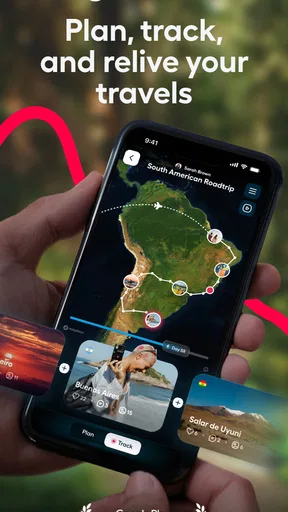
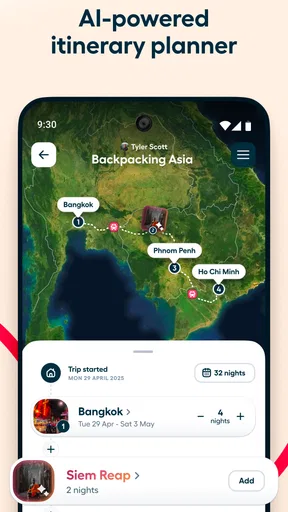
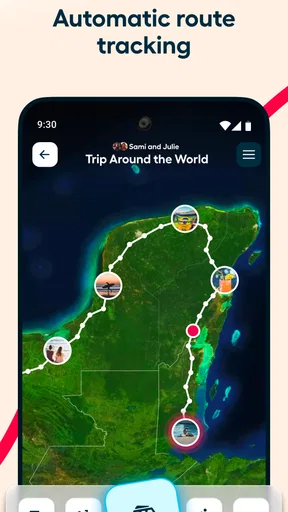
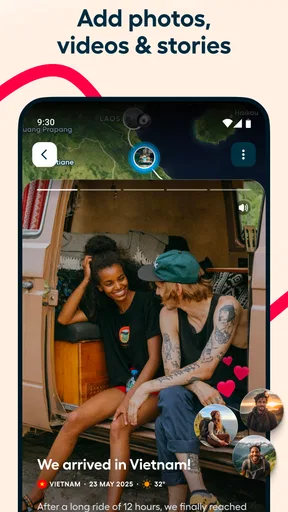

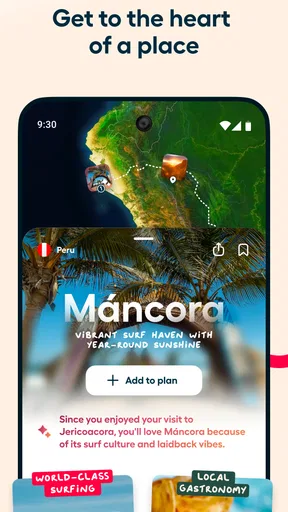
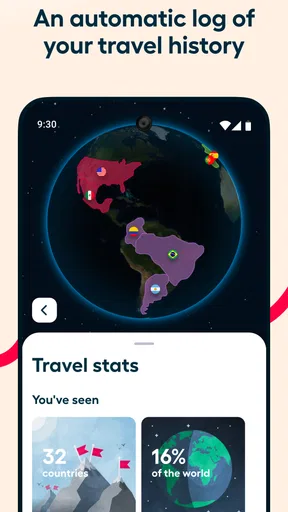
Our Review of Polarsteps
 Analysis by Appyee
I installed Polarsteps expecting a simple way to remember where I had traveled, but it quickly felt more like a living travel diary. The app sits in the Travel & Local category and comes from Polarsteps Travel, with a free entry point that makes it easy to try without planning a purchase first. My first impression was strong: it turns a trip into something visual and personal instead of leaving memories scattered between a photo gallery, map screenshots, and notes.
That first-week appeal is real, especially if you are preparing for a journey or have just returned from one. The map gives a trip a shape, while the diary-style presentation encourages you to connect places with moments. I liked that the experience is not limited to famous destinations. It can also make a road trip through nearby areas, a visit across several U.S. states, or a collection of countries feel like one coherent story.
Why the first week feels so satisfying
What makes the app immediately enjoyable is the combination of travel tracking and trip planning. Instead of treating a journey as a list of bookings, it gives you a visual record that grows as the trip develops. That difference matters. A standard maps app is excellent for getting from one place to another, but it rarely becomes a satisfying personal archive. A photo app stores images well, yet it does not naturally explain the route between them. Polarsteps works in the space between those two habits.
I found the strongest early use case was setting up a trip before leaving, then using the app as a lightweight framework for the journey. I could think about destinations, stops, and the order of travel without turning the whole process into a spreadsheet. This is useful for someone who wants structure but does not want to plan every hour. The app feels more inviting than a conventional itinerary because the result is something I would actually want to revisit later.
It is also a good fit for sharing the feeling of a trip with people who are not traveling with you. A relative can understand the broad route, while a friend can follow the changing story without needing access to a collection of separate messages. That said, I would not treat it as a replacement for every travel tool. For exact transport times, reservations, visa details, or a carefully optimized daily schedule, I would still use dedicated services and keep important confirmations elsewhere.
The app’s broad adoption supports that initial impression. It has passed 10 million installs and holds a 4.7 average from around 191 thousand ratings, which suggests that the central idea works for a large audience. Those numbers do not guarantee that every traveler will enjoy it, but they do match what I experienced: the learning curve is gentle, and the reward appears quickly.
One practical tip is to decide before your trip what you want the app to be. If you want a polished memory book, take a moment to add meaningful context rather than relying only on automatic tracking. If you mainly want a route record, keep your updates brief and avoid turning the journey into another task. That choice prevents the common mistake of beginning with ambitious diary entries and abandoning the project once the holiday becomes busy.
A realistic everyday travel scenario
Imagine spending a week moving between several cities, with a mixture of trains, short walks, and unplanned stops. In the morning, you can use the planning side to keep the day’s direction clear. During the afternoon, you can capture a place that was not on the original route. At night, instead of sorting dozens of photographs, you can add a short note about what actually mattered. By the end, the trip has a narrative rather than a pile of disconnected evidence.
This workflow is especially helpful for travelers who dislike writing long journals. A sentence about a rainy market, a missed connection, or a café discovered by accident can be more valuable than a formal summary written months later. The app gives those small details a place beside the route, which is one of its less obvious strengths.
What remains useful after the novelty fades
The more important question is whether Polarsteps earns space on a phone after the first exciting trip. In my experience, the answer depends on whether you travel often or enjoy maintaining personal records. For frequent travelers, the app can become a continuing visual index of places visited. Over time, that makes it easier to remember not only destinations but also the order and context in which they happened.
The month-to-month value is less about opening the app every day and more about having a dependable place to return to. I could imagine using it before a new journey to look back at an earlier route, compare the pace of different trips, or remember which stops deserved more time. That kind of value is quiet. It does not feel like a daily productivity system, but it can become a useful personal travel archive.
It also works well for people who travel in different styles. A backpacking trip can be recorded as a long route, while a series of weekend breaks can remain separate memories. Families may appreciate having one shared place for a holiday story, and solo travelers may enjoy the private sense of continuity. Couples can use the same record to preserve details that might otherwise be remembered differently later.
There is a trade-off, though. The app’s long-term usefulness depends on the quality of what you put into it. If you only allow the route to exist without adding any personal detail, the result may become visually interesting but emotionally thin. On the other hand, if you document every minor movement, the record can become cluttered. I found that selective updates produced a better archive than trying to record everything.
Another concrete insight is to use the app as a post-trip sorting tool rather than only a live tracker. After returning home, I would revisit the route and choose the moments that best represented the journey. That second pass changes the app from an automatic log into a more intentional memory. It takes a little effort, but it is where much of the lasting value comes from.
The free price is a major reason the app is easy to keep around. You can test the core experience without committing money at the start, while optional in-app purchases range from $9.99 to $34.99 per item. I would judge those extras based on how seriously you want to preserve or present your trips, rather than assuming every traveler needs them. Someone who takes one short holiday every few years may be perfectly satisfied with the free experience, while a devoted traveler may see additional options as worthwhile.
Where it beats familiar alternatives
Compared with a normal maps application, Polarsteps is better at turning movement into a story. Maps are built around navigation and location search; this app is built around remembering and presenting a journey. Compared with a notes application, it provides a stronger geographic structure. Compared with a photo gallery, it adds the route and sequence that photographs often lack.
Those comparisons also show where another option may be better. If your priority is live navigation, traffic information, public transport accuracy, or detailed reservations, use the specialist tool designed for that job. If you want complete control over formatting and long-form writing, a notes app may feel less restrictive. Polarsteps is strongest when you want a travel record that is attractive, organized, and easier to maintain than a fully custom journal.
I would also avoid making it the only place where essential travel information lives. A beautiful trip record is not the same thing as an emergency folder. Keep booking references, identification details, insurance documents, and critical offline information in a separate, dependable location. That is not a criticism of the app; it is simply the sensible boundary between a memory tool and a travel administration system.
Maintenance, fatigue, and the habits that decide its future
The maintenance burden is moderate rather than overwhelming. The app is designed to reduce manual work, but a meaningful travel diary still benefits from occasional attention. The friction appears when a trip becomes hectic. After a long day, I may not want to review the route, choose photographs, and write a thoughtful update. If the app starts to feel like homework, the habit can disappear quickly.
My preferred routine would be a short evening check-in, followed by a more careful edit after returning home. That separates recording from polishing. During the trip, I would capture only the essentials: where I went, what stood out, and perhaps one image that carries the mood of the day. Later, I could improve the presentation without interrupting the experience itself.
Battery and connectivity are also practical considerations for any location-based travel tracker, even though they are not the reason I would choose this app. I would not assume that every part of a journey will be equally convenient to record. Remote areas, long transport days, and limited access to a stable connection can make continuous documentation less appealing. A good habit is to treat the app as a companion to your trip, not as a requirement for the trip to count.
There are several sources of fatigue. First, the novelty of watching a route develop can wear off after the first few journeys. Second, repeated updates may begin to feel similar, especially on trips with many ordinary transit days. Third, people who already maintain a photo workflow, a private journal, and several planning tools may see another layer as unnecessary. The app is pleasant, but pleasant is not the same as essential for everyone.
Privacy and audience also deserve personal consideration. Some travelers enjoy sharing their movements, while others prefer to keep exact travel patterns private. I would decide in advance which parts of a trip should be visible and which should remain personal. The best experience comes from choosing a sharing style that feels comfortable, rather than publishing simply because the app makes a journey easy to display.
A less obvious trade-off is that the app encourages a retrospective version of travel. Routes and selected moments create a clean story, but real journeys are often messy, repetitive, and full of waiting. That polished structure can be rewarding, yet it may also tempt you to document what looks good instead of what felt important. I would keep a few imperfect notes alongside the attractive highlights; those are often the details that bring a trip back most vividly.
Who should keep it, and who should skip it
I would recommend Polarsteps to people who travel at least occasionally and want more than a folder of pictures. It is particularly suitable for travelers who like maps, visual timelines, shared memories, and light planning. It is also a good choice for someone who has tried traditional journaling but could not sustain long entries. The app lowers the effort enough to make a record feel achievable.
I would be more cautious if you rarely travel, dislike location-based organization, or want a highly technical itinerary manager. Business travelers who care mostly about receipts, schedules, and expense records may gain more from a dedicated work-travel system. Likewise, travelers who want a completely private, text-heavy diary may prefer a notes or journaling application with fewer presentation assumptions.
The age rating is Teen, so families should consider whether the app’s sharing and travel-recording style suits the young person using it. The application supports Android from version 8.0 onward, which makes it accessible on many older devices, although the experience will naturally depend on the phone itself and how comfortably it handles travel photography and location use.
The current version is 10.8.1, and I appreciate that the product is still presented as an actively maintained travel companion rather than a one-time scrapbook utility. Even so, version numbers should not be the deciding factor. The real question is whether you will use the app after the first trip. If you know you will not revisit or update your travel records, the initial excitement may not justify adding another account and routine.
My long-term verdict
After the first-week charm settles, Polarsteps still has a clear reason to exist: it connects places, movement, and memories in a way that ordinary maps, galleries, and notes do not. Its recurring value is strongest when I use it selectively, return to older journeys, and accept that a good record does not need to capture every minute.
I would not call it an indispensable travel tool, and I would not replace navigation, reservations, or document storage with it. Its strengths are more personal. It helps a trip become a coherent story, gives scattered photographs a route to belong to, and offers a gentle planning structure without demanding a rigid schedule.
The app earns lasting space for me because the maintenance can be kept small while the payoff grows over time. A few thoughtful updates during a trip, followed by one cleanup session afterward, are enough to create something I would genuinely want to revisit. That balance is the key: use it as a memory-making aid, not as another obligation to manage.
My final recommendation is simple. Try the free version if you want a map-based travel diary and are willing to add a little personal input. Keep a separate system for essential travel logistics, and skip optional purchases unless you understand exactly how they improve your own workflow. For the right traveler, the lasting value is not the novelty of seeing a route appear; it is having a personal travel history that becomes more meaningful with every journey.
In that sense, Polarsteps succeeds where many travel apps stop. It does not merely help me get somewhere. It gives me a reason to remember how I got there, what changed along the way, and which parts of the journey were worth carrying forward.
Verdict
Strengths of Polarsteps
- Automatically tracks trips and creates a visual travel journal.
- Works in the background with minimal interaction while exploring.
- Lets you add photos, notes, and memories to each location.
- Shareable trip pages make it easy to keep friends and family updated.
- Travel statistics provide useful summaries of visited places and distances.
Limitations of Polarsteps
- Background location tracking can noticeably affect battery life.
- Some advanced travel-planning features require a paid subscription.
- Location data may be inaccurate indoors or in remote areas.
- Offline use is limited compared with fully dedicated navigation apps.
- Privacy-conscious users may dislike continuous location collection.
Similar Picks in This Category
View All
Google Maps
Google LLC3.4

Google Maps Go
Google LLC4.1

Booking.com: Hotels & Travel
Booking.com Hotels & Vacation Rentals4.8

Google Earth
Google LLC3.8

Skyscanner Flights Hotels Cars
Skyscanner Ltd4.8

trivago: Compare hotel prices
trivago N.V.4.4
Frequently Asked Questions
What is Polarsteps and how does it work?
Polarsteps is a travel-tracking app that automatically records your journey and turns it into an interactive travel story. After enabling location tracking, it can follow your route while you move between destinations, allowing you to add photos, notes, places, and activities. The app is designed to work quietly in the background, so you can focus on traveling instead of updating every location manually.
Does Polarsteps work without an internet connection?
Yes, Polarsteps can continue tracking your trip when you are offline, which is especially useful when traveling abroad or visiting areas with limited coverage. The app stores your location data on the device and synchronizes it when an internet connection becomes available. However, you should check your phone settings and battery level before traveling, since background location services can affect battery life.
Does Polarsteps use a lot of battery or mobile data?
Polarsteps is built to minimize battery and data consumption, but continuous location tracking may still use more power than ordinary app usage. Battery impact depends on your phone, travel conditions, GPS signal, and system settings. Mobile data usage is generally limited, particularly when the app is offline, but uploading photos and synchronizing a long trip can consume additional data.
Can I share my Polarsteps trips with friends and family?
Yes, Polarsteps allows you to share your travel stories with other people. Depending on your privacy settings, you can keep a trip private, share it with selected people, or make it accessible through a link. Friends and family can follow your journey, view destinations, photos, and updates, making the app useful for keeping others informed without sending individual messages throughout the trip.
Can I create or order a printed travel book through Polarsteps?
Polarsteps can turn a completed trip into a personalized travel book using the route, photos, locations, and notes collected in the app. Before ordering, you can usually review and customize the content, although available options, prices, shipping, and delivery times may vary by country. A reliable internet connection is recommended when preparing the book, especially for trips containing many high-resolution images.
